


How to Find Your Own Phone Number on Any Phone
The quickest way to find your own number: on Android, open Settings → About phone → SIM status; on iPhone, open Settings → Phone, where it shows under "My Number". If that is blank or you are on a new SIM, tap Detect my number at the top of this page to read it automatically, or dial your carrier code.
Forgot your own number, got a new SIM, or just set up a work phone? It happens to everyone. This guide covers the fastest ways to find your number on any phone — in your settings, with our free detector, or by carrier code.
Understanding Your Phone Number
Your phone number isn't just a random assortment of digits. It's a structured code, each section having its own purpose and significance.
Area Codes and Country Codes
The first few digits of your phone number usually represent the country code or area code. This part of the phone number provides information about the geographical region the phone number originates from. Country codes are regulated by the International Telecommunication Union (ITU), ensuring each country has its unique identifier.
Local Number
After the country or area code comes the local number. This is the section of the number that is unique to you. In many countries, the local number is often split into an exchange code (or central office code) and the subscriber number.
Managing Your Phone Number
Having a better understanding of your phone number allows you to manage it more effectively. From safeguarding your privacy to optimizing communication, there are numerous ways to harness the power of your phone number.
Keeping Your Number Secure
Your phone number can be used to access a vast amount of personal information. As such, keeping your number secure is a crucial step in maintaining privacy in the digital age. Be mindful of who you give your phone number to and be wary of unsolicited calls requesting personal information.
Transferring Your Phone Number
Thanks to the Federal Communications Commission’s (FCC) “local number portability” (LNP) rules, most phone numbers can be transferred to new service providers. This process, known as porting, allows you to maintain your phone number when you switch telephone companies.
Useful Features of Phone Numbers
Modern telecommunication has introduced several features to enhance the utility of your phone number.
Caller ID
Caller ID allows for the identification of incoming calls by displaying the caller's number. Some systems can even display the caller's name and location.
Call Forwarding
Call forwarding allows you to redirect incoming calls to a different number, ensuring you never miss an important call. This feature can be customized based on your preferences.
Below, find your number by device (iPhone, Android, landline), with our free detector, or by carrier code — plus tips and troubleshooting.
How to Find Your Phone Number on an iPhone
- Open the Settings app on your iPhone.
- Scroll down and select Phone.
- Your phone number will be displayed at the top of the screen under My Number.
How to Find Your Phone Number on an Android Phone
- Open the Settings app on your Android device.
- Depending on your device, you may need to scroll down and select About Phone or About Device.
- Look for Status or SIM Status.
- Your phone number should be listed under My Phone Number or SIM Card Status.
How to Find Your Phone Number on a Landline Phone
The process of finding your landline number may vary depending on your service provider. Here are general steps:
- Dial a friend or family member who can see caller ID.
- Ask them to read back your number.
- Or use whatismynumber.io app to do it yourself without the need of friends.
Alternatively, you can check your phone bill or contact your service provider directly.
Quick Tips for Remembering Your Phone Number
If you often find yourself forgetting your number, here are some tips to help:
- Write it down in a secure location.
- Save it in your phone's notes or reminders.
- Memorize the number through repetition.
- Create a catchy jingle or rhyme to remember the digits.
Troubleshooting Phone Number Issues
If you can't find your number, or it's not displaying correctly, here are some troubleshooting steps:
- Restart your device.
- Remove and reinsert your SIM card.
- Check for any available software updates.
- Contact your service provider for further assistance.
Find your number with our free tool
When your phone's settings show nothing — a brand-new SIM, a work phone, or a swapped SIM — the free whatismynumber.io tool reads your number for you, with no sign-up, on any device:
Using the whatismynumber.io website
- Visit whatismynumber.io in your web browser, whether you're on Chrome, Windows, iPhone, or Android.
- On the website, you'll see a section that says "Number Detection" on the right side of the page.
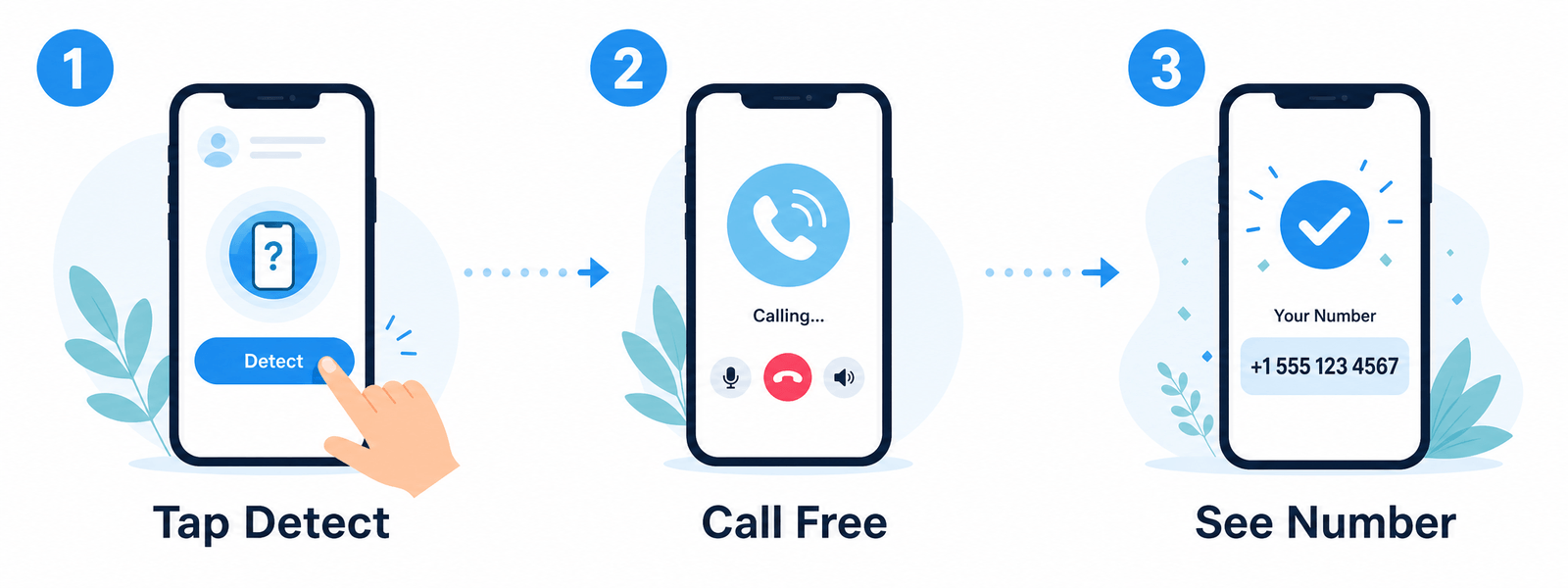
- Simply follow the instructions there. Whatismynumber.io will provide you with a phone number to call. By calling this number, the service will detect your phone number and display it on the page.
Using the "What Is My Number" app
- If you prefer a more direct approach, you can download the "What Is My Number (whatismynumber.io)" app on your Android or iOS device.
- Once the app is installed, open it.
- The app will attempt to read your phone number directly from the SIM card.
- In just one touch, you'll have your phone number displayed on the app.
That's it! Whether you use the website or the app, whatismynumber.io makes it easy to find your phone number when you need it most.
Know your carrier? See the exact code to check your number by carrier (Jio, Airtel, Vodafone, O2, EE, T-Mobile and more).
Frequently asked questions
How do I find my phone number on an iPhone?
Open the Settings app, tap Phone, and your number is shown at the top under "My Number". You can also use whatismynumber.io to detect it automatically.
How do I find my phone number on Android?
Open Settings, go to About phone (or About device), then Status or SIM status, and look for "My phone number". Or use whatismynumber.io to detect it automatically.
How does whatismynumber.io detect my number?
We give you a test number to call. The call is free and we never pick up. When you call it we detect the calling number and display it back to you on the page.
Is whatismynumber.io free?
Yes. The website and the Android, iOS, Chrome and Windows apps are free to use.
Wrapping Up
Knowing how to find your phone number is a basic yet crucial skill in our digital age. Whether you're using an iPhone, an Android device, or a landline phone, this guide should have you covered. To quickly find your phone number use the Detect now button at the top of this page.
Remember, if you're still having issues, your service provider is there to help. They can provide specific instructions tailored to your device or service.